Finalize Audience
Last updated: October 7, 2026
Finalizing an audience lets Switchboard do most of the audience processing work ahead of a scheduled broadcast, so your messages start going out the moment your send begins. It's most useful for large audiences, complex saved searches, and sends timed to specific, high-demand moments.
Finalizing is optional. If you don't finalize, we do that processing when the send starts and your broadcast still sends as normal.
How it Works
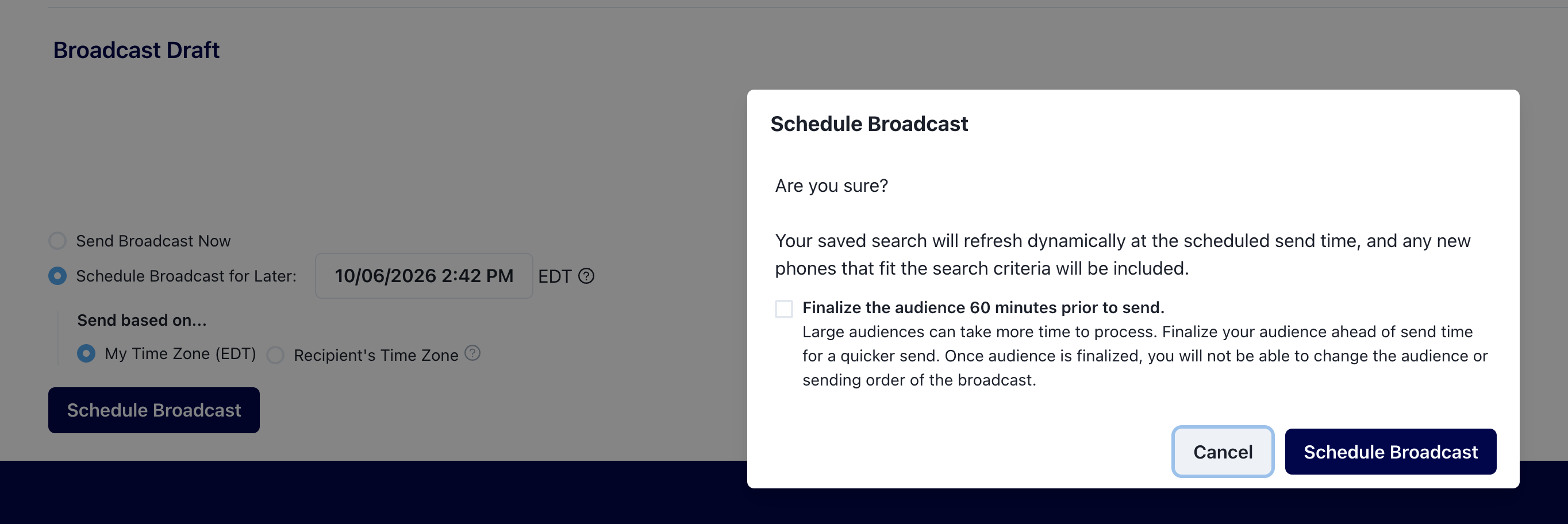
When you select "Schedule Broadcast" you will have the option to check Finalize the audience 60 minutes prior to send in the pop up. If selected, we'll start processing your audience an hour before your scheduled send time, so it's ready to go when the send begins.
If you are using a Saved Search as your audience, it is evaluated at the time it is finalized (60 min prior to send), so your audience is as current as that moment, not as current as the send time. If you want your audience to be fresh as of send time, you might want to skip this finalizing feature.
Once finalizing has started, the audience and sending order stay locked for that broadcast, even if you unschedule it. Everything else works as usual: you can still edit your copy, schedule the send or send it right away, pause and unpause, use automatic pause, or decide not to send the broadcast at all.
If you need to change an audience after it has been finalized:
Open the broadcast and choose Duplicate. Your copy, schedule settings, and other broadcast details carry over to the duplicate.
In the duplicate, select the new list or saved search you want.
Change your sending order and schedule on the duplicate if you want.
Unschedule, then Archive the first broadcast.
Troubleshooting and Common Questions
Will my sends be slower if I don't finalize?
No. Finalizing is an optional head start, not a requirement. Broadcasts without a finalized audience send exactly as they always have.
My send time passed and the broadcast hasn't started
If the audience is still processing at send time, the broadcast waits and starts automatically as soon as it's ready. This is rare but may happen with complex saved searches, where processing can run past the 60-minute lead time.
If you see this repeatedly, email support@oneswitchboard.com with the broadcast name and we can check on it.
If someone opts out after I finalize, will that be respected?
Yes. We check opt-out status at the moment each message is sent, so finalizing in advance has no effect on opt-out management.
If I reuse the same list or search in a future broadcast, will it already be finalized?
No. Finalizing applies to one broadcast only. Finalize again in the new broadcast when you're ready.