Targeting your donors
Last updated: October 9, 2025
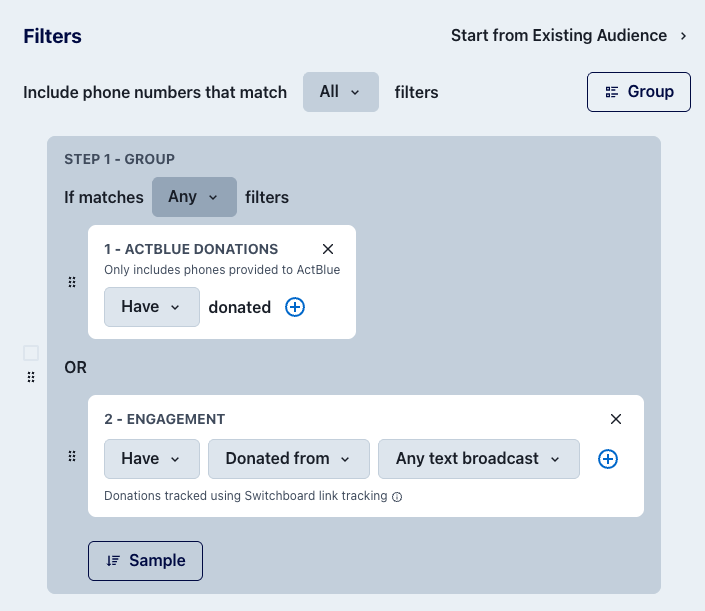
To create an audience of donors, you will want to use two filters - an Engagement filter and an ActBlue Donations filter, assuming you have an ActBlue integration set up.
Why you need both
The ActBlue Donations "Have donated" filter specifically pulls phone numbers that were provided directly to ActBlue during the donation process. However, not all donors provide their phone number when making a donation through ActBlue.
When you send texts or emails through Switchboard and someone donates without providing their phone number to ActBlue, we can still track that they donated, if you're using one of our shortlinks. These donors are captured by the Engagement "Have donated via Switchboard" filter.
Best practice for comprehensive donor targeting
To ensure you capture all donors in your audience, use both filters together:
Have donated (ActBlue donations filter)
Have donated via Switchboard (engagement filter)
Set these filters in a group with an "OR" condition so that phones matching either criteria will be included in your audience.
This combination ensures you capture:
Donors who provided their phone number directly to ActBlue
Donors who gave through your Switchboard broadcasts but didn't provide their phone to ActBlue